
Know what's left of an order
before you accept it.
NaviTMS is a TMS for small and medium-sized transport and forwarding companies. Once you enter the loading point, unloading point and rate, you see the estimated cost and margin, and after delivery every order gets a label: profitable or unprofitable.
Order ZL-00148
An estimate from the cost calculator, worked out once you enter the stops and the rate, before the order is saved.
Organized work you can see from day one.
When operations, costs and documents live in one place, you plan transport more smoothly, and margins and settlements stay visible in real time.
For the owner
Margin control
You see the estimated margin before you accept an order: the calculator works out the route cost from distance, fuel and driver labour. The profitability report shows which orders, vehicles and drivers make you money, and where you lose it.
Decisions backed by numbers.Driver pay without Excel
Days from the schedule and absences, rates from the driver record, bonuses and deductions as line items. An approved settlement becomes a cost in profitability right away, so closing the month no longer ends in a spreadsheet.
The month closed in one place.Your whole company, one view
The dashboard shows the current state of orders, fleet utilization and financial results. You check the company's situation yourself, without waiting for reports from the team.
A faster read on the situation.A full history for every order
Transport documents, costs and the invoice stay permanently linked to the order they belong to. You handle a complaint or a settlements audit with the full set of data in hand.
Complete documentation for every order.For forwarders and dispatchers
No more retyping
An order from a PDF loads itself: AI reads the addresses, dates, rates and fills in the form. You don't copy data by hand, so there are no typos and no minutes lost on every order.
Less clicking, fewer mistakes.Fewer empty kilometers
SpediMap shows you, on a map, the contractors you've already worked with near a spot where you have or will have a free vehicle. Mark a radius, and in three clicks you send everyone in it a message that a truck is available.
Get back with a load sooner.Every change is logged
Changes to orders, costs and settlements are recorded with a name and a date. When a figure on an invoice looks off, you trace where it came from right away, instead of digging through correspondence.
Calmer settlements.Work without installing anything
The system runs in your browser, so there's no software to install. Your team works from the office, from home and from a phone, always on the same system.
Get in right away, from anywhere.A ready-made system for small and medium-sized companies. For larger ones, we keep building.
NaviTMS takes over the repetitive work of handling orders and keeps an eye on the details where manual work most easily goes wrong. You pick the version that fits the scale of your company.
NaviTMS
For small and medium-sized transport and forwarding companies.
- A ready-made system, launched in its standard version, with no programming.
- During onboarding we adapt numbering, dictionaries and order statuses to the way your company works.
- New features come from requests made by companies that work in the system every day.
NaviTMS Enterprise
For larger organizations, where the standard version isn't enough.
- On top of NaviTMS we build a system around a specific company's processes, all the way to a fully tailored version.
- Integrations with the tools you already use, for example ERP or WMS.
- Separate pricing and timeline, agreed after a process analysis.
The key modules, shown through the problem they solve.
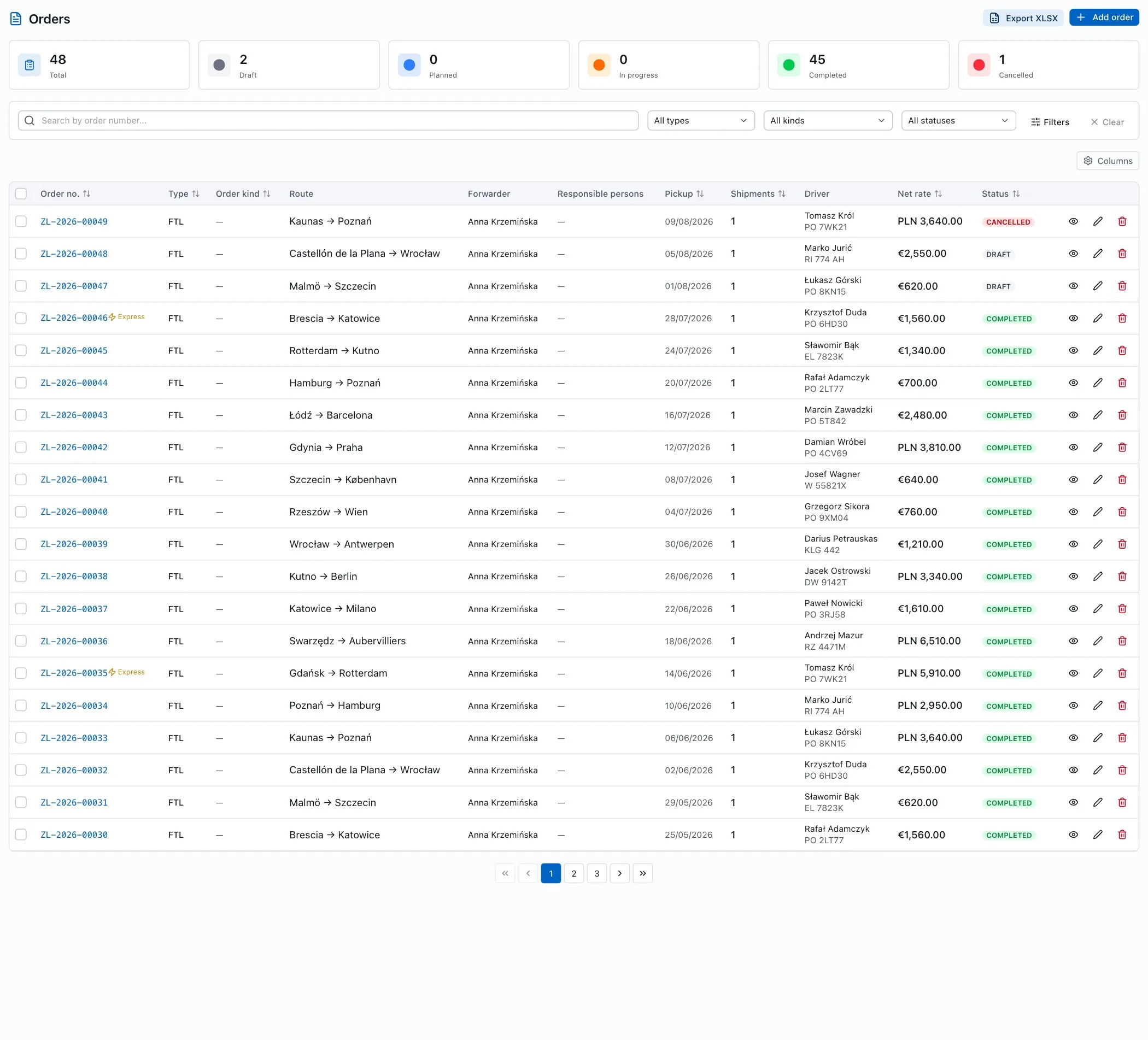
From order to settlement in one flow.
Keep the order, its shipments and route legs together. When you change a status or assign a carrier, the related data updates itself.
- AI loads the order from a PDF: addresses, dates and rates go straight into the form.
- Statuses and shipments sync automatically.
- Configurable columns, statuses and numbering.
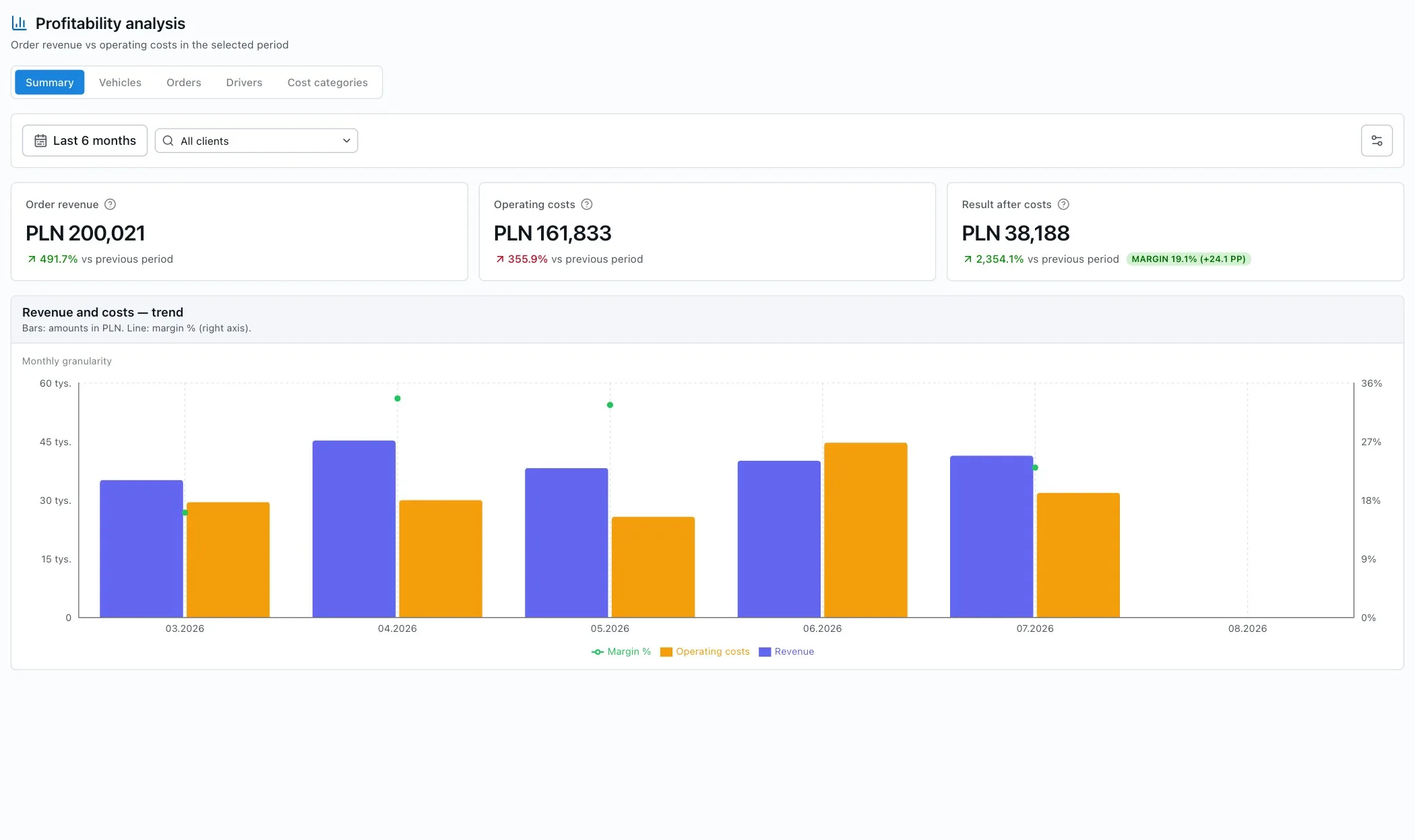
See how much the business actually keeps.
You see the estimated cost of an order before you accept it: the calculator works it out from distance, fuel consumption, fuel price and driver labour, plus parameters you set yourself. After delivery, the report shows the result broken down by vehicle, driver, order and cost category.
- Cost and margin estimate as soon as you enter the loading point, unloading point and rate.
- Every order labelled: profitable or unprofitable.
- Revenue and costs as a monthly trend, with period comparison.
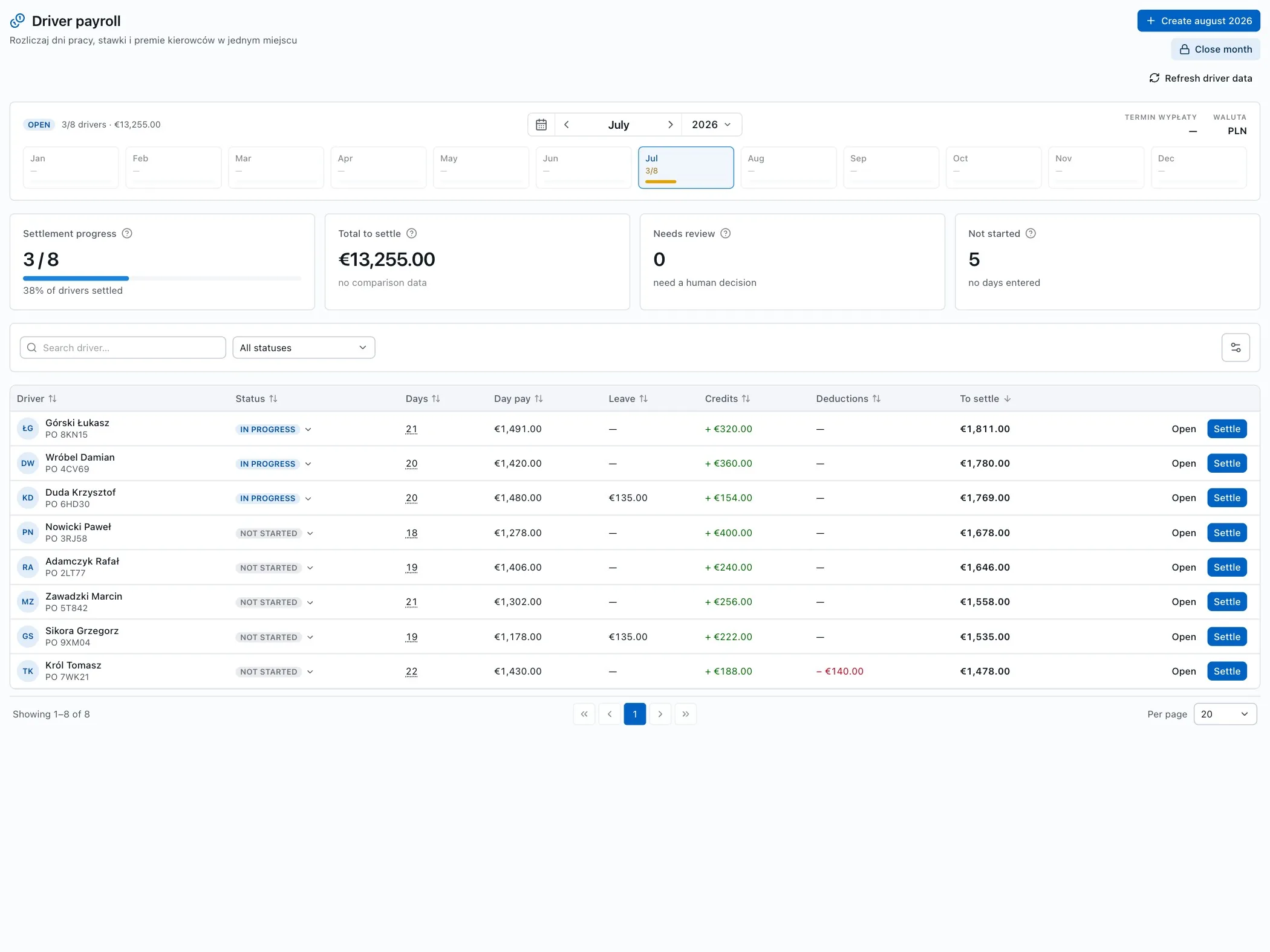
Driver pay from the schedule, without Excel.
NaviTMS pulls days from the schedule and absences, applies rates from the driver record, and you add bonuses, per diems and deductions as line items in any currency. A closed month feeds straight into costs and performance analysis.
- Days from the schedule and leave counted automatically.
- Daily rates from the driver record.
- Bonuses, per diems and deductions as line items, in any currency (NBP rate).
- An approved settlement = an operating cost in profitability.
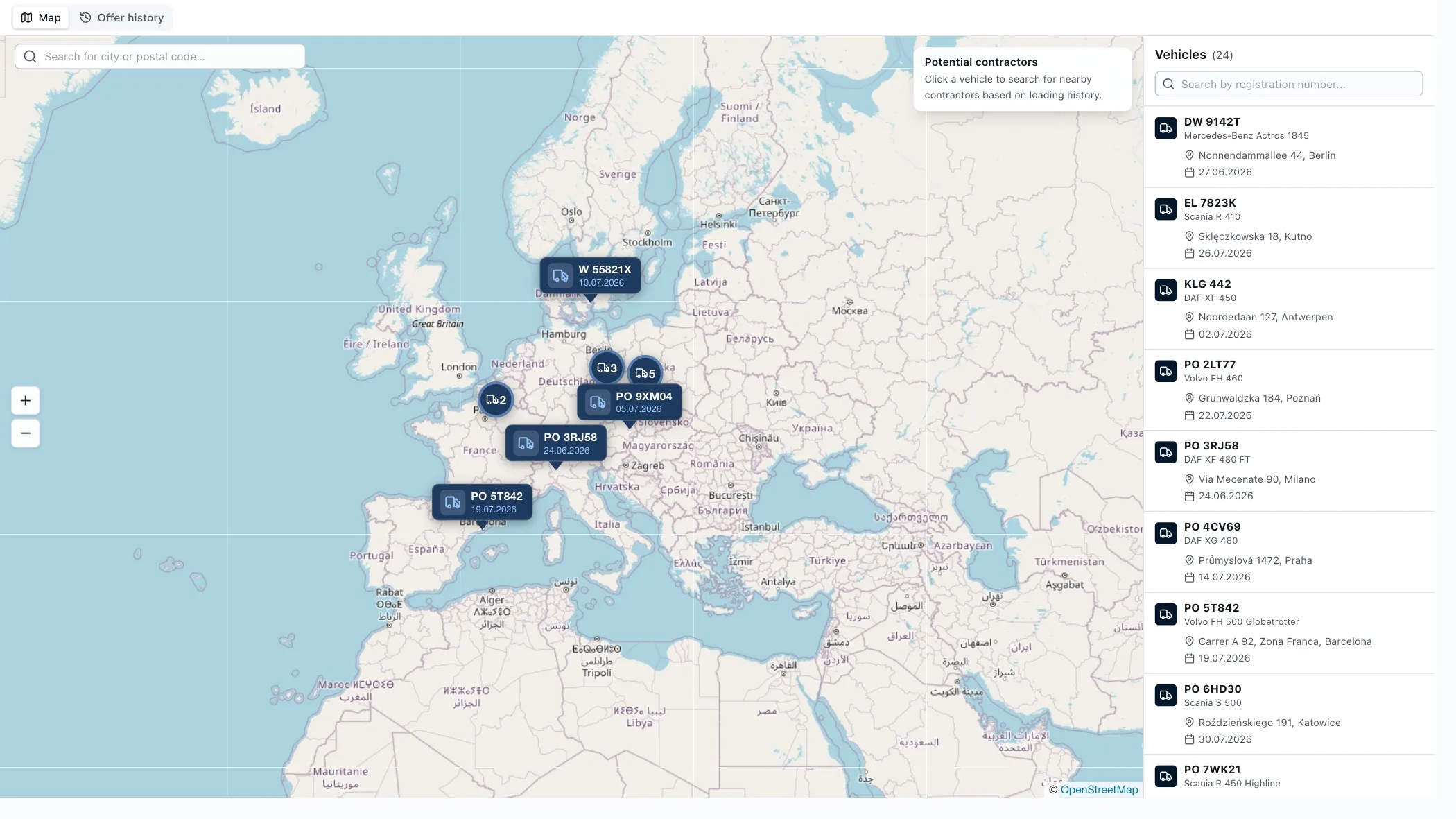
Contractors always within reach.
Addresses turn into points on the map, and you can find contractors and vehicles within a set radius. Less manual searching, faster decisions when planning a route.
- Contractors within a 5–500 km radius.
- Send an offer to the selected companies.
- Fast company search in a chosen area.
Know when a vehicle leaves its route.
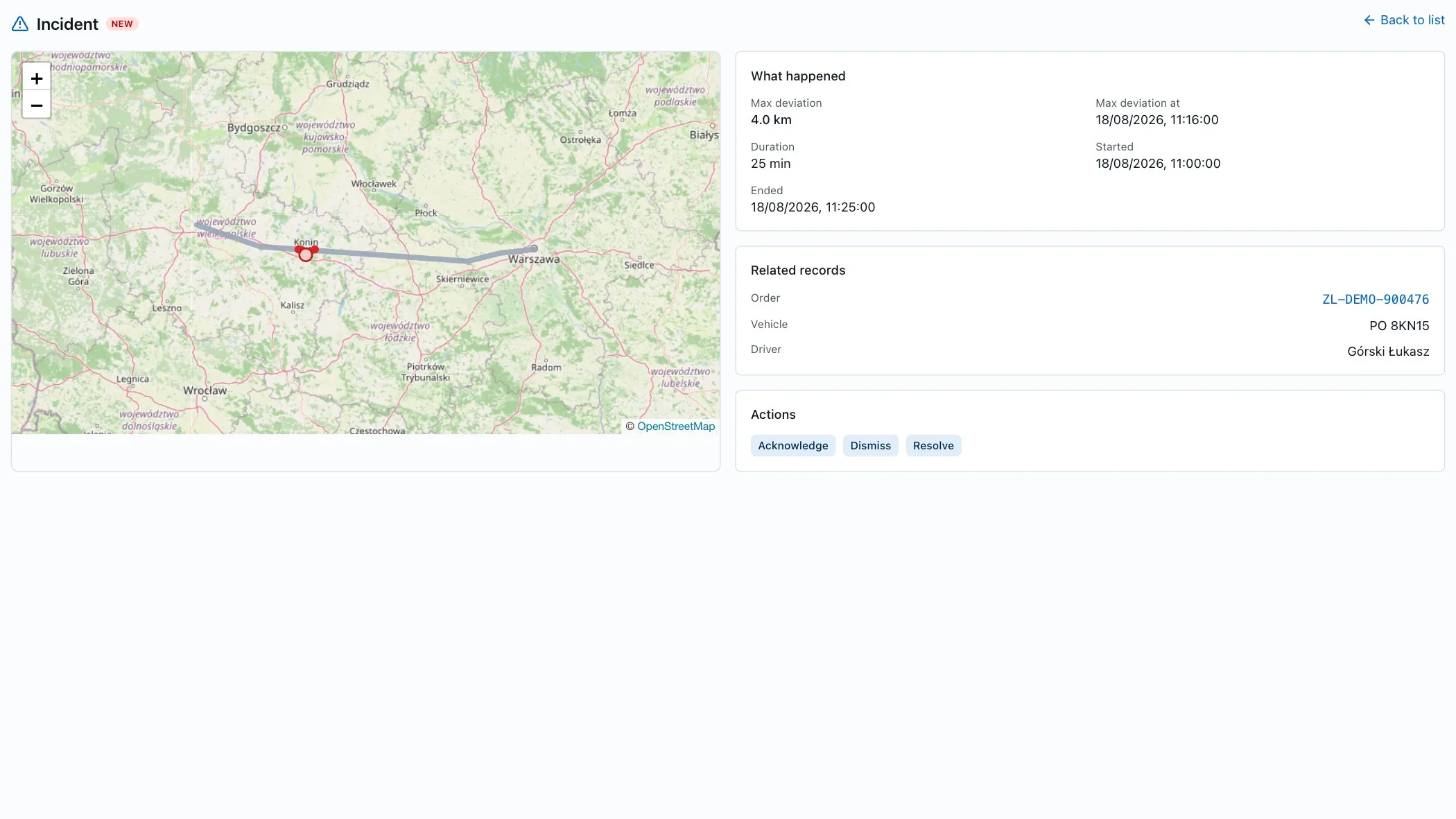
Corridor monitoring compares the GPS position against the planned route widened into a corridor. When a vehicle stays outside the corridor longer than the confirmation window, an incident is created with the GPS track, maximum deviation and duration.
- GPS track and maximum deviation on the map.
- Confirm, dismiss or resolve incidents.
- You set the corridor width and confirmation time.
Integrations and standards
Issue and send invoices directly to Poland's National e-Invoicing System (KSeF), including in offline mode.
Plan routes and calculate distance, travel time and tolls across the entire journey.
Drivers receive notifications and route details on WhatsApp, without calling in for every detail.
Send text messages with order status or reminders wherever there's no internet coverage.
An order from a PDF loads itself, with no manual data re-entry.
Amounts in foreign currencies convert automatically at the current NBP exchange rate.
Onboarding, together with you.
We run onboarding as a shared process, from the first conversation to everyday work. We start by getting to know how you work, and finish with developing the system further together with you.
We learn how you work
We talk about how you operate today and where you lose the most time.
We configure NaviTMS
We set up NaviTMS around your processes, numbering and dictionaries.
We onboard your team
We help move your work into the system and answer questions at go-live.
We support and grow with you
We stay available after launch and develop the solution together with you.
See how NaviTMS will streamline your company's work.
We run the demo around how your company actually works. We show your own processes in NaviTMS.
- A demo tailored to your processes.
- A no-obligation talk about implementation.
Book a free demo
We'll get in touch to arrange a convenient time. Fields marked * are required.